
The Winamp Mini Player
Ctrl+M (Cmd+Shift+M on macOS), the shrink button beside the settings gear,
or Switch to it in Settings turns Fastpotify into a small player that
wears classic Winamp skins: the .wsz files of the Winamp 2 era, of which
the Winamp Skin Museum keeps tens of thousands.
There is one window at a time; the logo in the skin’s corner, Eject, or
Ctrl+M again brings the big window back where it was.
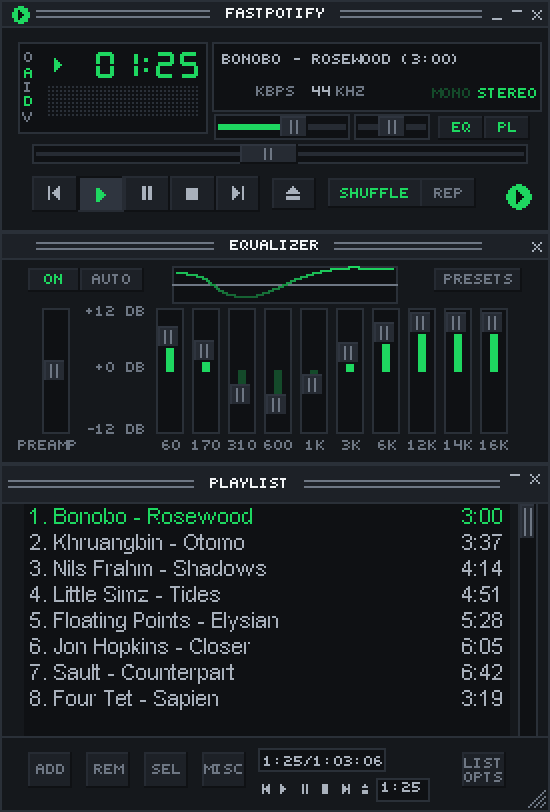
Drop a .wsz on either window and Fastpotify copies it into its skins
folder and puts it on. Settings lists every skin in that folder, with the
built-in one first, and has a button to open the folder.
The window is drawn at a whole number of screen pixels per skin pixel, so the pixels stay crisp at any size. Pick 1x to 4x from the menu behind a right-click on the title bar (or the O at the display’s edge), where always-on-top lives too; D toggles double size and A always on top, as they did. Drag the title bar to move it; it reopens where you left it, and the keyboard shortcuts work there too.
The buttons do what they say, with a few translations. Stop pauses and
rewinds, I opens the playing album in the big window, and repeat is on
or off. PL opens the playlist window under the player, in the skin’s
own frame and colours and the small unsmoothed lettering of the time: what
is playing, then the queue; double-click a
song to play from there, Ctrl-click to select several, drag the corner to
make it taller, and its X or PL again closes it. Its buttons do what
Spotify allows of what Winamp’s did: ADD finds music, SEL picks rows,
MISC opens the song’s pages, LIST OPTS plays one of your playlists or
saves the queue as a new one, and REM only explains that no app can take
from Spotify’s queue. Notices that the big window shows as toasts scroll
through the marquee here. EQ opens the equalizer between the player and the playlist: Winamp’s
ten bands and its presets, shaping the music played on this computer (a
speaker across the room plays what Spotify sends it). The preamp goes
twelve decibels either way, and AUTO, which loaded a preset per song in
Winamp, lays the bands flat here. The same
equalizer is in Settings with its curve drawn out. The X and both logos
of the main window bring back the big window; its shade button, or a
double-click on the title bar, rolls it up to a bar with the time, a small
transport, and a seek bar, as Winamp’s shade mode did. Skins that are not
rectangles keep their shape: whatever their region.txt leaves out is
see-through. Quitting is in the right-click menu and Ctrl+Q.
Click the time to count down instead of up. The balance slider moves the
sound between the speakers and the MONO and STEREO lamps are a switch,
both for music played on this computer. The playlist’s own shade button
rolls it up to a title bar and down again, and the equalizer’s rolls it up
to a bar that keeps the volume and balance on it as tiny sliders, as Winamp
2.9 drew it; skins from before then wear the built-in bar for that. The display’s left box is the
spectrum analyser, peaks and all, in the skin’s own colours; click it for
the oscilloscope, and again for nothing, or pick from the menu behind
V. It shows the sound leaving this computer, so a device across the
room leaves it flat. Modern (Winamp 3 and 5) skins are a different format
and are not supported.
MilkDrop, Winamp’s visualiser, opens as its own window, the way Winamp
ran it: the vis button in the big window’s top bar, the V menu on the mini
player, Ctrl+Shift+K, or Settings opens it. Fastpotify draws it through
projectM, which plays
MilkDrop’s own .milk presets. It is a window of its own for a reason: it
runs in a separate process with its own graphics, so it can never disturb
the player’s window. Drag the picture to move the window, double-click it or
press F to fill the screen, Esc to come back or close it, and drag
the bottom-right corner to resize. Presets fade into one another every
thirty seconds (Settings sets the time); the right arrow, N, or space
moves on at once, the left arrow or P goes back, and L keeps the one
playing. Presets live in the milkdrop folder of the config directory;
nothing ships inside the app, and Settings fetches the two packs projectM
curates into it: the 550 that came with MilkDrop 2, and Cream of the Crop,
9,800 of the community’s best. Until there are any, projectM shows its own
idle preset. Like the analyser, it shows the sound leaving this computer.